What Happens When a Browser Loads a Web Page?
Have you ever wondered what happens after you type a website address into your browser and press Enter? Within a short time, the browser connects to servers, requests files, processes code, and displays the web page on your screen.
So, what happens when a browser loads a web page?
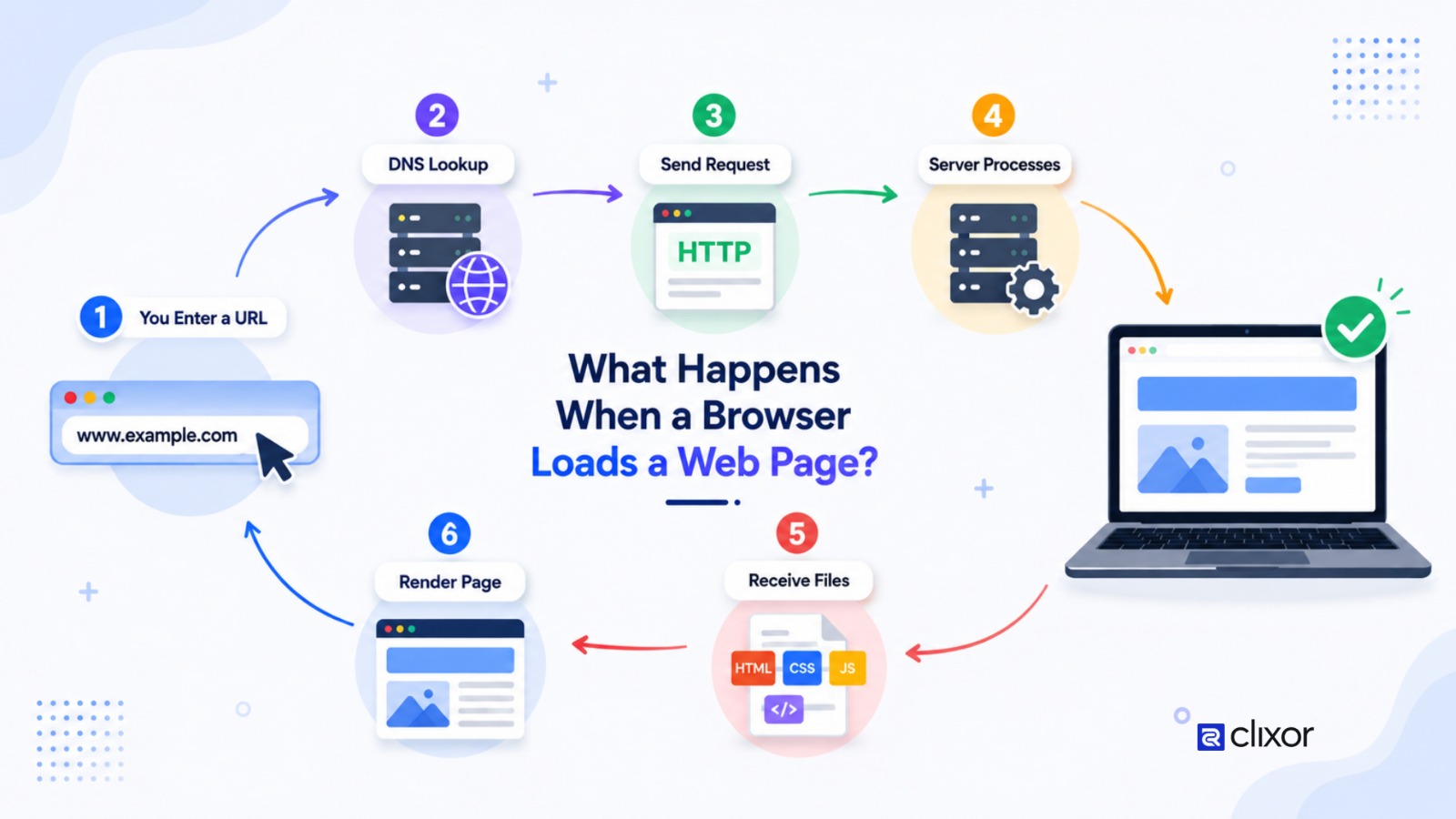
The process involves several steps, including DNS lookup, establishing a connection, sending an HTTP request, receiving website files, parsing HTML and CSS, running JavaScript, and rendering the final page.
Understanding this process can help developers build faster and more efficient websites.
The Browser Reads the Website Address
The process starts when you enter a URL into a browser such as Chrome, Firefox, Safari, or Edge.
The browser identifies the website's domain and determines which resource you are requesting.
For example, when you enter a website address, the browser needs to find the server responsible for that domain before it can request the page.
DNS Finds the Server
The browser uses the Domain Name System (DNS) to translate the domain name into an IP address.
Humans can easily remember domain names, but computers use IP addresses to communicate with servers.
The DNS lookup helps the browser determine where it should send the request.
Once the correct server is identified, the browser can begin communicating with it.
The Browser Connects to the Server
After finding the server, the browser establishes a connection.
For websites using HTTPS, the browser also performs the necessary security steps to establish an encrypted connection.
This helps protect information exchanged between the browser and website server.
The Browser Sends an HTTP Request
The browser then sends an HTTP request to the server asking for the required web resource.
The request can include information such as the requested URL and details about the browser or accepted content types.
The server receives the request and determines which information to return.
The Server Sends Website Files
The server processes the request and sends a response back to the browser.
A typical web page may require several resources, including:
HTML
CSS
JavaScript
Images
Fonts
Videos or other media
The HTML file provides the basic structure of the page, while CSS controls its appearance and JavaScript can provide interactive functionality.
The Browser Parses HTML
After receiving the HTML, the browser reads and processes it.
The browser builds a structure called the Document Object Model (DOM) from the HTML elements.
For example, headings, paragraphs, buttons, images, and links become part of this structure.
The DOM helps the browser understand what elements need to appear on the page.
CSS Is Processed
The browser also downloads and processes CSS files.
CSS tells the browser how different elements should look, including their:
Colors
Fonts
Sizes
Spacing
Positions
Layouts
The browser combines the HTML structure with CSS rules to determine how the page should be displayed.
JavaScript Runs
If the website uses JavaScript, the browser executes the relevant scripts.
JavaScript can add interactive features such as menus, sliders, forms, animations, filters, and dynamic content.
However, poorly optimized JavaScript can increase the amount of work the browser must perform and may affect page load times.
The Browser Renders the Page
The browser now calculates how elements should be positioned and displayed.
It creates the necessary rendering information and paints the content onto the screen.
This is when you start seeing the actual webpage.
Images, text, buttons, navigation menus, and other visual elements are displayed according to the HTML and CSS.
Additional Resources: Continue Loading
A webpage may continue requesting resources even after some content becomes visible.
For example, images, fonts, videos, analytics scripts, and other resources may load afterward.
Modern websites often use techniques such as caching, compression, lazy loading, and optimized assets to improve the overall experience.
Why Does This Process Matter for Website Performance?
Every step can affect how quickly a page becomes usable.
Slow DNS resolution, server response times, large files, inefficient CSS, excessive JavaScript, or unoptimized images can contribute to slower loading.
This is why website performance optimization considers both server-side and browser-side factors.
For businesses, understanding the web page loading process can help identify performance problems and create a better experience for visitors.
Conclusion
So, what happens when a browser loads a web page?
The browser first identifies the server through DNS, establishes a connection, sends a request, receives website resources, processes HTML and CSS, executes JavaScript, and renders the page for the user.
Although the process happens quickly, many technical steps are involved. Understanding these steps helps developers build websites that are efficient, responsive, and easier to maintain.